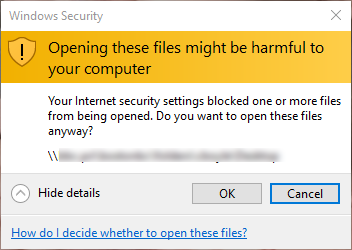
Create a GPO and enable three settings. Related descriptions and values explained in citations.
Both Computer Configuration and User Configuration need these policies modified:
Policies > Administrative Templates > Windows Components > Internet Explorer > Internet Control Panel > Security Page- Intranet Zone Template > Enabled > Low
- This template policy setting allows you to configure policy settings in this zone consistent with a selected security level, for example, Low, Medium Low, Medium, or High. If you enable this template policy setting and select a security level, all values for individual settings in the zone will be overwritten by the standard template defaults.
- Site to Zone Assignment List > Enabled > Show…
- ValueName =
yourserver.domain.com
A host for an intranet site, or a fully qualified domain name for other sites. The valuename may also include a specific protocol. For example, if you enterhttp://www.contoso.comas the valuename, other protocols are not affected. If you enter justwww.contoso.com, then all protocols are affected for that site, including http, https, ftp, and so on. The site may also be expressed as an IP address (e.g.,127.0.0.1) or range (e.g.,127.0.0.1-10). - Value =
1(Intranet zone)
- ValueName =
- Intranet Zone (folder)
- Show security warning for potentially unsafe files > Enabled > Enable
If you enable this policy setting and set the drop-down box to Enable, these files open without a security warning. If you set the drop-down box to Prompt, a security warning appears before the files open.
- Show security warning for potentially unsafe files > Enabled > Enable
You may also want to add trusted sites to the approved zone. Do that here:
Computer Configuration > Policies > Administrative Templates > Windows Components > Internet Explorer > Internet Control Panel > Security Page > Site to Zone Assignment ListTrust Administrators
Computer Configuration -> Windows Settings -> Security Settings -> Local Policies -> Security Options -> User Account Control: Run all administrators in Admin Approval Mode = Disabled
Category: